Delogue PLM · 2025
Delogue PLM · 2025
Designing Clarity: Rebuilding a platform around how people actually work.
From Complexity to Clarity:
Reshaping Information Architecture for Better UX
A 4-month initiative to rebuild a fragmented enterprise platform from the inside out - aligning information architecture, navigation, and interaction patterns to how users actually work. Led across Product, Engineering, Customer Success and Sales.
A 4-month initiative to rebuild a fragmented enterprise platform from the inside out - aligning information architecture, navigation, and interaction patterns to how users actually work. Led across Product, Engineering, Customer Success and Sales.
A 4-month initiative to rebuild a fragmented enterprise platform from the inside out - aligning information architecture, navigation, and interaction patterns to how users actually work. Led across Product, Engineering, Customer Success and Sales.
My Role
Lead Product Designer
Duration
4 months
Team
Product, Engineering, CS, Sales
Information Architecture
Service Design
User Research
UX Design
Design systems
Stakeholder alignment
problem
A platform build for the company,
not the user
Understanding
the status-quo
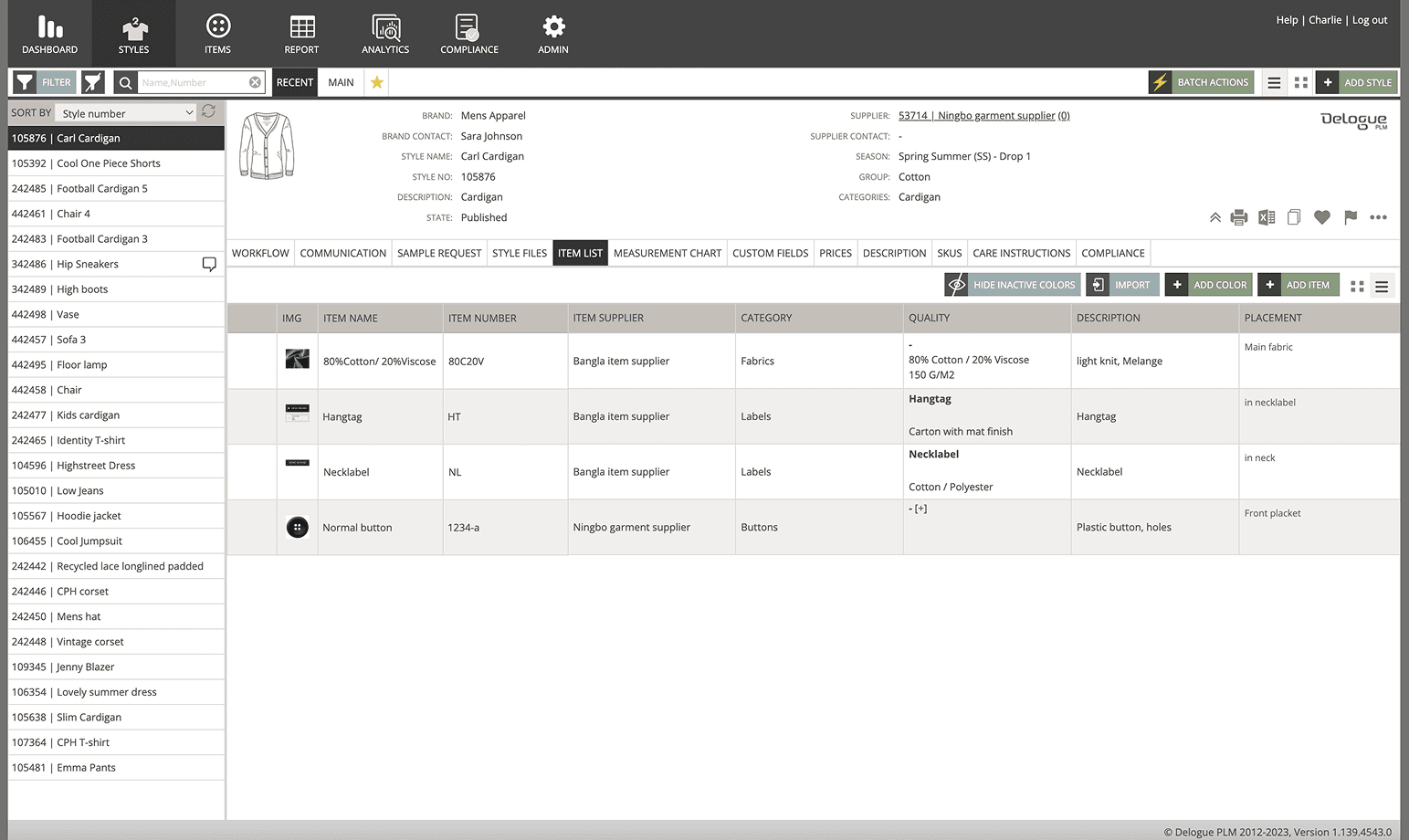
Years of incremental feature additions had created a patchwork experience. Navigation reflected the org chart, not user workflows. New users faced cognitive overload - too many options, no clear path forward. For the business, this translated directly to longer onboarding cycles, a high volume of support requests, and deals lost in demos when prospects couldn't see how the tool fit their work.
The issue wasn't any single screen. It was a structural problem spanning the entire product - which meant any real fix required stepping back from the interface entirely and rethinking the underlying logic.
Uncovering navigation insights through workflow mapping and JTBD analysis.
Goal: Aligning the findings with our product vision and design principles
- Aligned product direction by collaborating with Customer Success and Sales
- Improved feature adoption through on-site visits and data-driven workflow insights
- Enhanced information architecture by identifying user logic via card sorting exercises.
the before: outdated design, fragmented structure:
Uncovering navigation insights through workflow mapping and JTBD analysis.
Goal: Aligning the findings with our product vision and design principles
- Aligned product direction by collaborating with Customer Success and Sales
- Improved feature adoption through on-site visits and data-driven workflow insights
- Enhanced information architecture by identifying user logic via card sorting exercises.
overwhelming
Faster
Onboarding
Unnecessary information distracted from the task at hand, causing decision fatigue.
misaligned
Boosted
Efficiency
Workflows didn't match how users actually operated, increasing churn risk.
frustrating
Scalable
Design
Information overload led to stress, errors, and a lack of trust in the platform.
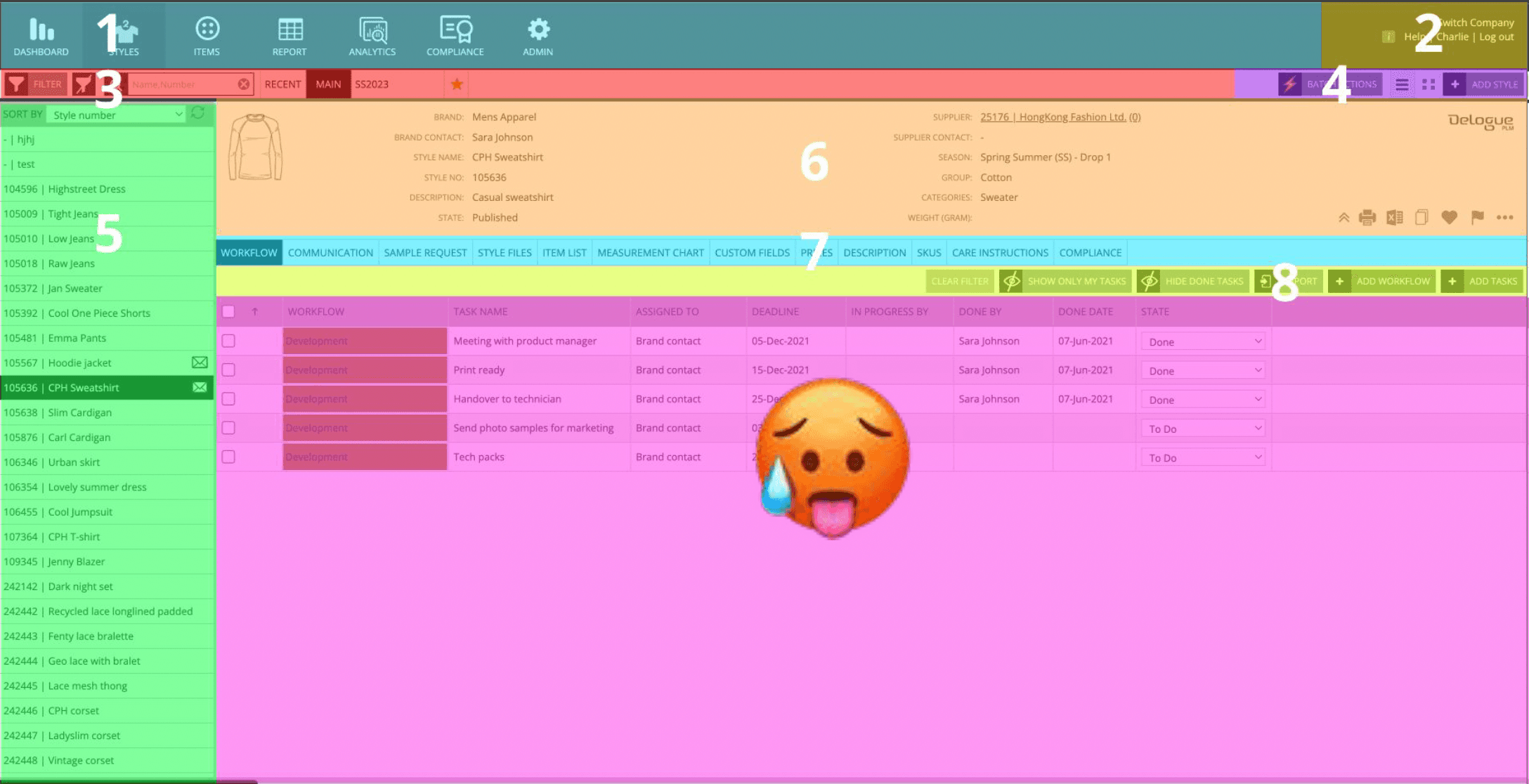
a color coded UX-audit surfaced the core issues at glance
discovery
Mapping the system before
touching a screen
Understanding
the status-quo
Before starting the design process, I ran workflow mapping sessions and jobs-to-be-done analysis with users across different roles. I embedded with Customer Success and Sales to understand where users consistently got stuck - and why. On-site visits and card sorting exercises revealed a fundamental mismatch: users organised their work around seasonal deadlines and team handoffs, while the platform was structured around product data categories.
That single insight reframed everything. It wasn't a navigation problem - it was a mental model problem. The redesign needed to reflect how work actually moved through a team, not how data was stored in a database.
A colour-coded UX audit made the scale of the issue visible to stakeholders at a glance - mapping fragmentation, redundancy, and orphaned flows across the entire platform. This became a critical alignment tool in early cross-functional conversations, giving Engineering and Product a shared view of where the system was breaking down.
Uncovering navigation insights through workflow mapping and JTBD analysis.
Goal: Aligning the findings with our product vision and design principles
- Aligned product direction by collaborating with Customer Success and Sales
- Improved feature adoption through on-site visits and data-driven workflow insights
- Enhanced information architecture by identifying user logic via card sorting exercises.

key decisions
Three decisions that shaped
the re-design
Understanding
the status-quo
decision
Default to relevance, not flexibility
Understanding
the status-quo
Users faced empty tables and had to manually configure filters and columns on every session - a high-effort start that led to frustration and abandonment. Rather than offering a blank canvas, I designed role-based default views using usage data and user profiles. Each role saw the most relevant data points immediately, without configuration.
Uncovering navigation insights through workflow mapping and JTBD analysis.
Goal: Aligning the findings with our product vision and design principles
- Aligned product direction by collaborating with Customer Success and Sales
- Improved feature adoption through on-site visits and data-driven workflow insights
- Enhanced information architecture by identifying user logic via card sorting exercises.
The trade-off: We chose relevance over maximum flexibility. Power users had less initial control - but testing showed the majority of users completed tasks faster when we reduced upfront choices. Power users could still save and switch custom views.
Uncovering navigation insights through workflow mapping and JTBD analysis.
Goal: Aligning the findings with our product vision and design principles
- Aligned product direction by collaborating with Customer Success and Sales
- Improved feature adoption through on-site visits and data-driven workflow insights
- Enhanced information architecture by identifying user logic via card sorting exercises.
decision
Hide depth, surface clarity
Understanding
the status-quo
All product information was displayed simultaneously - primary specs, secondary metadata, and tertiary details competing for attention on the same screen. I introduced progressive disclosure: the most important information surfaced by default, with secondary and tertiary detail accessible contextually. Each layer of depth was earned, not imposed.
The trade-off: Some experienced users initially felt information was being hidden from them. We addressed this through clear affordances for expanding detail and a short onboarding sequence that oriented users to the new logic. Resistance dropped significantly after the first few sessions.
Uncovering navigation insights through workflow mapping and JTBD analysis.
Goal: Aligning the findings with our product vision and design principles
- Aligned product direction by collaborating with Customer Success and Sales
- Improved feature adoption through on-site visits and data-driven workflow insights
- Enhanced information architecture by identifying user logic via card sorting exercises.
decision
Reduce options to reduce errors
Understanding
the status-quo
Users saw all available actions at once regardless of context, leading to decision fatigue and frequent errors - they chose wrong actions because everything looked equally available. I scoped actions to each workflow state, revealing options contextually and guiding users step-by-step rather than presenting them with everything at once.
The trade-off: Risk of users feeling limited or losing a sense of control. We mitigated this by pairing contextual actions with clear next-step suggestions - maintaining agency while dramatically reducing support tickets related to incorrect actions.
Uncovering navigation insights through workflow mapping and JTBD analysis.
Goal: Aligning the findings with our product vision and design principles
- Aligned product direction by collaborating with Customer Success and Sales
- Improved feature adoption through on-site visits and data-driven workflow insights
- Enhanced information architecture by identifying user logic via card sorting exercises.
stakeholder navigation
Holding the line on structural change
Understanding
the status-quo
The most contested decision was contextual actions. Engineering flagged implementation complexity early, and there was pressure to revert to a simpler model - surface everything, let users filter. I pushed back, not on instinct, but with data: support ticket analysis showed that a significant share of errors came directly from context-blind action menus.
I reframed the conversation from "design preference" to "support cost and error rate," and brought CS into the room to speak to what they were seeing in onboarding calls. That shift - from design advocacy to shared business problem - is what got alignment. Engineering built it. It worked.
That moment shaped how I approach stakeholder resistance now: the design argument is rarely the strongest argument. Find the business argument underneath it.
Uncovering navigation insights through workflow mapping and JTBD analysis.
Goal: Aligning the findings with our product vision and design principles
- Aligned product direction by collaborating with Customer Success and Sales
- Improved feature adoption through on-site visits and data-driven workflow insights
- Enhanced information architecture by identifying user logic via card sorting exercises.
outcome
From confusion to confidence
Understanding
the status-quo
~ 50 % less
Faster
Onboarding
Reduction in onboarding calls per client, reported by Customer Success
errors declined
Boosted
Efficiency
Significant drop in support tickets related to incorrect user actions
scalable
Scalable
Design
Component-based system established - new features now ship faster and more consistently
key insight
"
Leading a core restructuring within a
beta launch required aligning
cross-functional teams and navigating
resistance to change - the hardest design
problem wasn't getting a solution, it was
getting people on board.
Understanding
the status-quo

Charlotte Kleckers
Copenhagen